Here is a guideline for how to submit a surplus disposal form on the Facilities Services website.
- Go to the Facilities Services website and select ‘Surplus Requests’
- On the Surplus Disposal Request form fill out all required fields
- Use the information from the asset profile to fill out the item(s) added to the disposal list. You will be able to add more than one item.
- Note: If the item is not on the main Pullman campus, it will need to be dropped off with Surplus. Use the ‘Surplus Stores Building’ if the item is being dropped off, you can use ‘Main Office’ for the room in this instance.
- After adding your item(s) to the Disposal List, add any relevant comments about your request
- If the item is being dropped off, include:
- The date (and if possible, a time frame) that the item is going to be dropped off, any relevant info about the state of the item.
- If someone else is the one who will be dropping the item off, add their name and information to the comments
- If the item is being picked up from a location on the main Pullman campus, please include:
- Any extra information that will help Surplus pick the item up smoothly (i.e., details on the location of your desk/the item, or if another person has possession of the item, and their contact info)
- If the item is being dropped off, include:
- Make sure your phone number listed is accurate (and the best number to get ahold of you should they need to reach out) and submit your request
- Madeline Green can be listed as the approver
Complete the Vehicle Information Form and email it to Surplus, then follow the instructions in the above section “How to Dispose of Non-Vehicle Assets” to submit a Surplus Disposal Request.
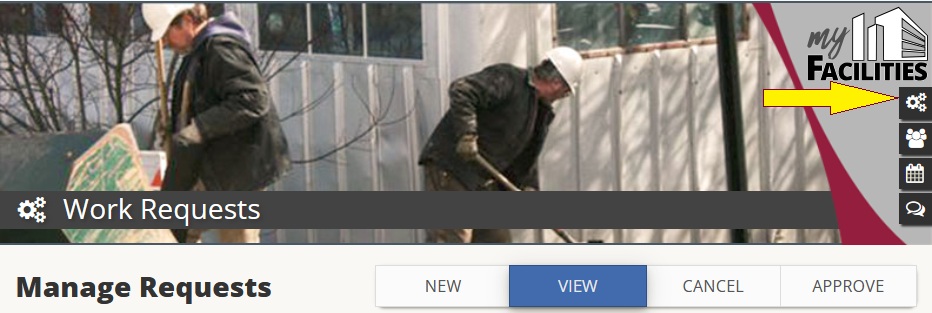
To access previous requests, select the gear icon (as shown in the image below) to go to the ‘Manage Requests’ screen.
In cases where the asset is out in the counties and it is unable/inconvenient to be brought to Pullman, please contact EBOT with asset details. EBOT will help determine if it needs to come to Pullman, or if there are alternative options for disposal.
EBOT Info
Mailing Address:
PO Box 646248
Pullman, WA 99164-6248
Location: Hulbert Hall, Room 411D
Mail Code: 6248
Email address: ebot.support@wsu.edu